You are in the middle of a change deployment into pre-production database. You need to run a few scripts. There is no pressure, this is pre-prod. You get interrupted after running the first script. You deal with the
problem, and return to your initial task of running the second script from the deployment plan.
You open up sqlplus, drag and drop script number two and notice the feedback:
Table dropped.
Table dropped.
Table
dropped.
At this moment you get a strange feeling, and your inner voice tells you
“Did you run this in the pre-prod environment,
or was that production.”
The first emotion you experience is panic, then fear, then you can see in front of your eyes within fractions of seconds, all the work you need to do, to restore the 3 tables.
The blood rushes out of
your brain, face, hands and finally your body.
You hesitate for a moment to check the database name, because you do not want to face the truth:
You
Just Dropped Three Tables In Production.
Finally you get the courage and run a select statement to get the database name, and notice that actually it was test, and not prod.
Relief.
Did this happen to you before? Maybe not dropping a table in production. Maybe it was a shutdown of the wrong database? Or killing a session in the wrong database?
Do you want to go through this
panic again?
I don’t.
DBAs are humans. DBAs make mistakes too.
The question is: How can we prevent these mistakes from happening?
Conventional wisdom tells us:
- be extra
careful when running a script.
- verify database name, prior to running a script.
- verify username prior to running a script.
- focus on the task at hand, don’t allow interruption (yeah right, I would need an isolating bubble in my cubicle for this
to happen)
These are all great suggestions, however do you see a problem with them?
All of these suggestions rely on one person, which is YOU. You can forget to check the database name. Maybe you already checked, at
the beginning of deployment, and when you got back to running the scripts, you accidentally clicked on the other sqlplus window.
I don’t know about you, but I have about 10 putty sessions and 5 sqlplus sessions open at any given time. It is easy to click on the wrong window.
How can we prevent these mistakes from happening?
AUTOMATE.
Take yourself out of the equation.
The environment where you are connected to, needs to display the information about itself.
1.What Information Does A DBA Need To Know When Connected To A Database?
2.What Controls SQLPLUS Settings?
3.How Do I Setup SQLPLUS, To Show The Information I Want/Need?
4.Bonus: whoami.sql – Script To Run Anytime
1.What Information Does A DBA Need To Know When Connected To A Database?
When I connect to a database, at a minimum I need to know WHERE I am, and WHO I am:
It is also nice to
have the current time displayed. Why?
- Because when you deploy changes, or run audit scripts, you don’t need to turn time on anymore.
How many times did you run a script, forgot to turn time on and ended up running the script again? I know it used to happen to me all the time. Not anymore.
It is also nice to have the server name and instance number, if you are running RAC. Why?
It is also nice to have the session identifier for your connection, your SID.
Why?
- Because if I need to identify this session, I can do it very quickly.
2.What Controls SQLPLUS Settings?
There are 2 files that control sqlplus settings:
- glogin.sql in
$ORACLE_HOME/sqlplus/admin
- login.sql in the SQLPATH environment variable
When you start sqlplus, the tool looks for one of these files. If and when these files are found, sqlplus will read and execute them. The
login.sql file overwrites glogin.sql
My preference is to use login.sql file.
3.How Do I Setup SQLPLUS, To Show The Information I Want/Need?
There are a few ways to do this, depending on where you are running sqlplus.
I
usually run sqlplus on the Unix server where the databases are, and also on my Windows desktop.
On Unix, the server name is already displayed at the top of your putty session, no need to worry about that.
I setup the login.sql file to display
time, db name and username. You can set other preferences in the file, such as linesize, pagesize and specific column sizes.
On Unix define $SQLPATH variable, and save login.sql to that location.
login.sql

set linesize 180
set pagesize 100
set time on
column dbname noprint new_value _dbname
column user noprint new_value _dbuser

select global_name  name from global_name;
select user from dual;
set sqlprompt "&_dbname. (&_dbuser) >"

/*
Sample output:

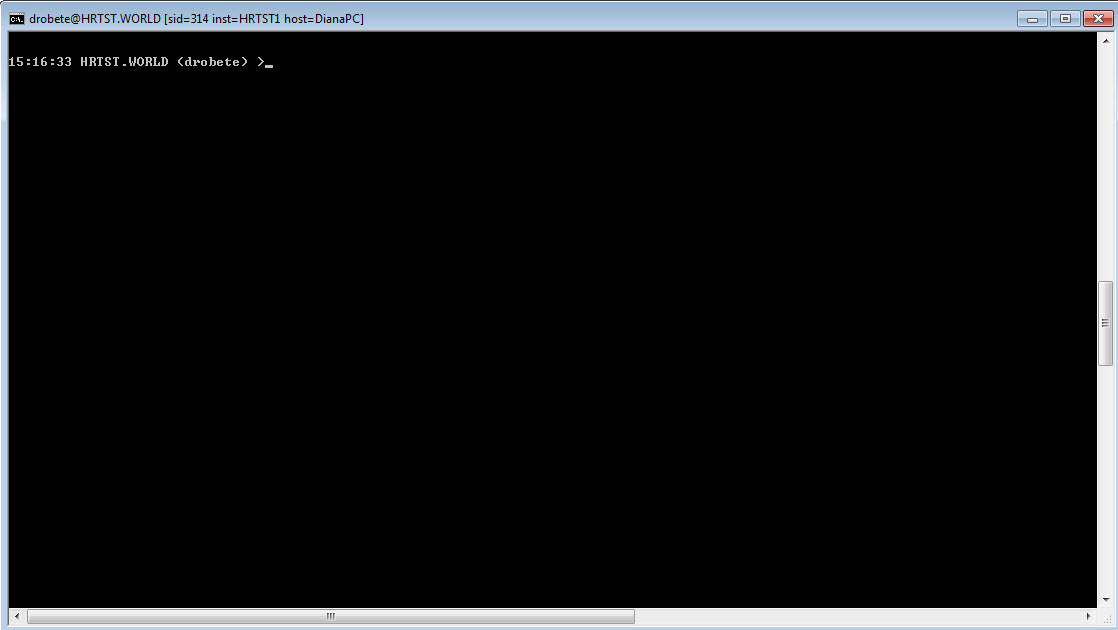
22:04:21 HRTST.WORLD (DROBETE) >
*/ |
On Windows, this is how I like my SQLPLUS command window. Notice at the top, the database name, instance name, SID and hostname.