Which DBA are you?
A. The one that kicks off a datapump
export/import, and forgets about it. (You start the process, then go for coffee or start working on something else.)
OR
B. The one that kicks off a
datapump export/import, then stares at the black screen and wonders, what the heck is the job doing? What table is being processed? It has been over 5 minutes and there are has been no changes on the screen. Is the job stuck?
I can relate to those DBAs that are in category B. I used to wonder what is datapump doing, especially for imports. You can tell the
last table that was loaded, and you have no idea what table is getting imported right now.
I used to ask myself how much time is needed for the export to complete.
I did not know the answer.
I used to ask myself, what table is getting imported, especially if the import was processing a large table.
I did not know the answer. I could tell the last table that was processed, but not the current one.
I used to ask myself, what is datapump doing, is the job hung, or is it actually processing data?
I did not know the
answer. I could only tell what the job did prior to this moment.
Do you ask yourself these questions? Or even better, are there other people asking YOU these questions.
I used to Google for queries to find answers to my questions, and usually by the time I found the answer, the export or import would complete. Then, I would forget all about the
queries, and next time I would start from the beginning.
Do you want to be able to answer questions like
- what is datapump doing?
- what table is being exported/imported?
- how far ahead is the export?
Look no further. Your
questions are answered by the two scripts I created. You only need to save them to your toolbox and start using them!
Below, I’ll share with you for FREE, my scripts to monitor datapump export and import jobs anytime.
/*
Script name: mon_expdp.sql

Example:     @mon_expdp.sql

Purpose:     To monitor datapump export jobs

Created By   Diana Robete
Copyright:   @2016 dbaparadise.com
*/

col job_name noprint new_value _job_name
col username for A20
col sid for 9999
col opname for A40
col %Done for A5
col "TimeLeft(sec)" for 9999999999999
col start_time for A22
set linesize 200
set verify off

select job_name from dba_datapump_jobs where state='EXECUTING';

SELECT a,sid, b.username, b.opname,
round(b.SOFAR*100/b.TOTALWORK,0) || '%' as "%Done",
TIME_REMAINING "TimeLeft(sec)",
to_char(b.start_time,'YYYY/MM/DD HH24:MI:SS') start_time
FROM v$session a, v$session_longops b
WHERE a.sid = b.sid
AND b.opname like '%&_job_name%';

!expdp \'/ as sysdba\' attach=&_job_name |
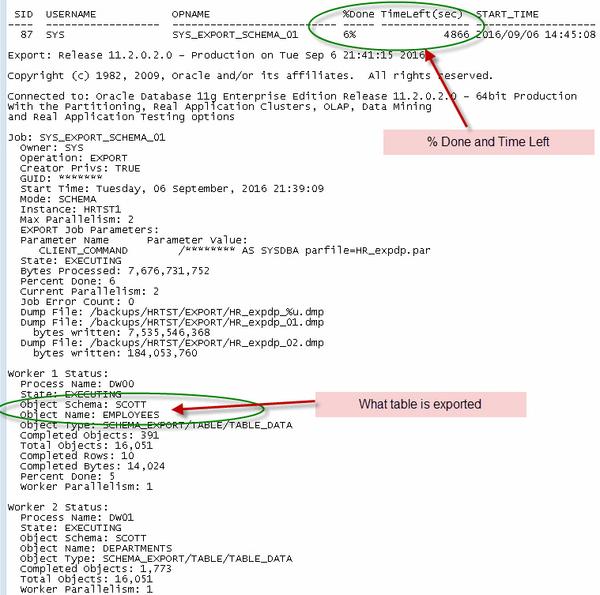
Sample Output