If you are an Oracle DBA, you are familiar with the concept of the recycle bin. You familiarized yourself with these concepts before, since it’s available starting with version 10g.
What you might not remember, are all the little things about it. How do I enable or disable the recycle bin? What objects go in the recycle bin? Who is maintaining it? What dictionary views to query?
There are so many little things to remember.
This is where I come in, with today’s post, that summarizes the answers to your questions, so you
can stop searching and start focusing on getting things done, such as purging the recycle bin or restoring a table!
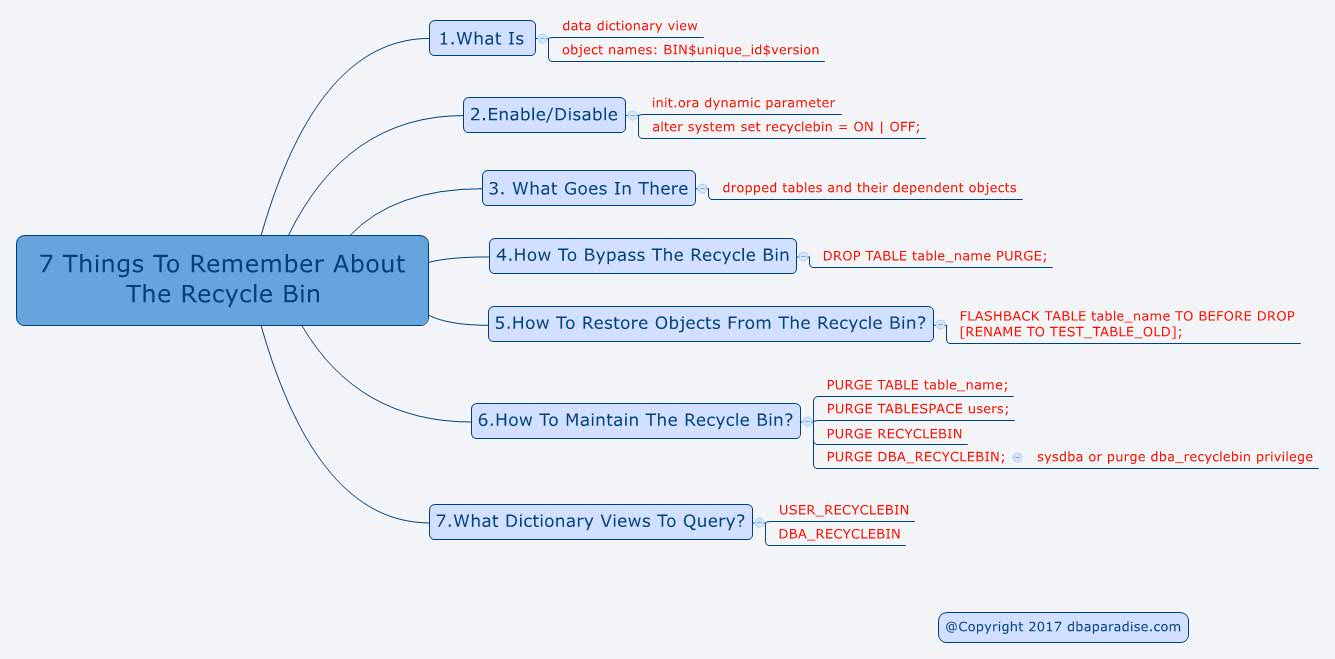
You already know I am a huge fan of Mind Maps! As a BONUS, at the end of the post I am sharing with you a Mind Map that summarizes everything you need to remember about the recycle bin, in one single picture!
Since Oracle 10g, when you drop a table in the database, the table doesn’t really get dropped.
Instead, the behavior is more like on a Windows desktop, after you drop a file, that file can easily be recovered from the recycle bin.
Translated to Oracle, when you drop a table, the table doesn’t get dropped, instead it goes into the recycle bin, with a different
name.
1.What Is The Oracle Recycle Bin?
2.How To Enable/Disable It?
3.What Objects Go/Don’t Go Into The Recycle Bin?
4.How To Bypass The Recycle Bin?
5.How To Restore Objects From The Recycle
Bin?
6.How To Maintain The Recycle Bin?
7.What Dictionary Views
To Query?
1.What Is The Oracle Recycle Bin?
Did you know the recycle bin is a data dictionary table that contains information about the dropped objects?
As mentioned before, when objects get dropped, they don’t actually get dropped. The objects are renamed. They still take up space in the database, and count
against the user’s quota, until these objects get purged.
One thing to remember is that the names of the objects change, once in the recyclebin.
The naming convention for dropped objects in the recycle bin is:
BIN$unique_id$version
where:
- unique_id – is a 26-character globally unique identifier for this object, which makes the recycle bin name unique
- version – is a version number assigned by the database
2.How To Enable/Disable It?
By
default the recycle bin is enabled.
There could be circumstances when the recycle bin needs to be disabled. I can hear the questions pouring in, but why would you disable the recycle bin?
There could be a number of reasons: administrative purposes, space constraints, other products used with Oracle that don’t support the recycle bin.
When the recycle bin is disabled, if you drop an object, the object is dropped forever, you can’t restore it (not easily).
A DBA needs to know how to enable/disable the recycle bin.
A dynamic init.ora parameter is controlling the recycle bin
behavior:
recyclebin : ON | OFF
alter system set recyclebin = OFF scope=both sid='*';  -- to disable
alter system set recyclebin = ON  scope=both sid='*';  -- to enable
3.What Objects Go/Don’t Go Into The Recycle Bin?
I always have a hard time remembering what exactly goes into the recycle bin. This might be related to the fact that most of the clients I work with have the recycle bin disabled.
When you drop a table, that table and all dependent objects for that table go into the recycle bin (indexes, triggers,
constraints, lobs, table partitions, index partitions).
Dropping a user, the objects that the user owns, are dropped as well, and they do not go into the recycle bin.
Dropping a cluster, the member tables do not go into the recycle bin.
Dropping a type, dependent objects (subtypes) do not
go into the recycle bin.
When you drop an index, the index doesn’t go into the recycle bin. Indexes only go into the recycle bin if the dependent table is dropped.
4.How To Bypass The Recycle Bin?
If you want to bypass the recycle bin, when dropping a table (permanently drop it), use
the PURGE option:
drop table TEST_TABLE purge;
5.How To Restore Objects From The Recycle Bin?
If you accidentaly dropped a table, the recycle bin can save you very quickly (if it is enabled).
The statement you need to remember and use, is the FLASHBACK TABLE … TO BEFORE DROP;
You can use the real name of the table, or the recycle bin name of the table
(BIN$).
FLASHBACK TABLE TEST_TABLE TO BEFORE DROP;
You can even restore the table with a different name:
FLASHBACK TABLE TEST_TABLE TO BEFORE DROP RENAME TO TEST_TABLE_OLD;
6.How To Maintain The Recycle Bin?
If you need to free up space in the recycle bin, or just want to clean it up, there are a few options in getting rid of the objects.
To only purge a table/index:
PURGE TABLE table_name;
PURGE INDEX index_name;
To purge object from a specific tablespace:
PURGE TABLESPACE users;
To purge the recyclebin that belong to a specific user:
PURGE RECYCLEBIN
To purge the whole recyclebin:
PURGE DBA_RECYCLEBIN;
limitations: you need SYSDBA privileges prior to 12c, or the PURGE DBA_RECYCLEBIN privilege in 12c.
7.What Dictionary Views To Query?
There are 2 views to query, and because you are a DBA, you will most likely use the latter:
USER_RECYCLEBIN, DBA_RECYCLEBIN.
The columns that
are helpful and worth remembering, are:
- OWNER
- OBJECT_NAME
- ORIGINAL_NAME
- DROPTIME
- CAN_UNDROP
- SPACE
As promised in the beginning, the mind map to use below. Click on it to
get the full version! Feel free to print it!