The nightly backup job you have scheduled for your database, the datapump export job, starts failing with the following error:
ORA-31693: Table data object “HRAPP”.”REPORT_TABLE” failed to load/unload and is being skipped due to error:
ORA-02354: error in exporting/importing data
ORA-01466: unable to read data – table definition has changed
The first time this happens you don’t think much of this error, you just re-run the job during the day. As expected, the job completes successfully, and you file the incident as a one time only occurrence.
Then, a week passes by, and the export job fails again, same error message, but a different table. This export job failure seems to happen always on the same day, and it alternates between a few tables. Now you start getting curious to figure out what is causing the error and how to fix it.
There are two things to figure out, in order to find the solution. We need to know what the cause of the error is, and under what circumstances this error occurs.
Let’s tackle the first thing. When does this error occur?
There are two conditions for this error to occur:
1) the export datapump job is running using the FLASHBACK_SCN parameter in the parameter file. Using this parameter means that the export datapump operation is performed with data that is consistent up to the specified SCN.
2) the table specified in the first line of the error (in our case HRAPP.REPORT_TABLE), is changed during the export datapump job. Usually the table definition is changed by a TRUNCATE command, while the export is running.
Let’s answer the second question. Why does this error occur?
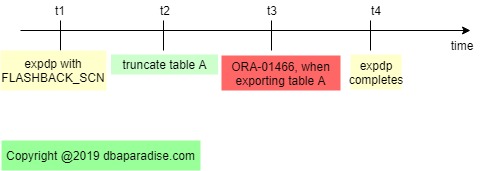
The error occurs because the LAST_DDL_TIME on the table is newer or more current than the FLAHBACK_SCN translated into a time. In other words, the LAST_DDL_TIME happened at a time after the FLASHBACK_SCN but before the export datapump job completed.
Here is a quick diagram to better understand what is going on