In the previous post, I showed you how to create an Application Container. Today, we will talk about the application itself, what it is, and what operations can be done within the application itself.
What is the Application inside the Application Root Container?
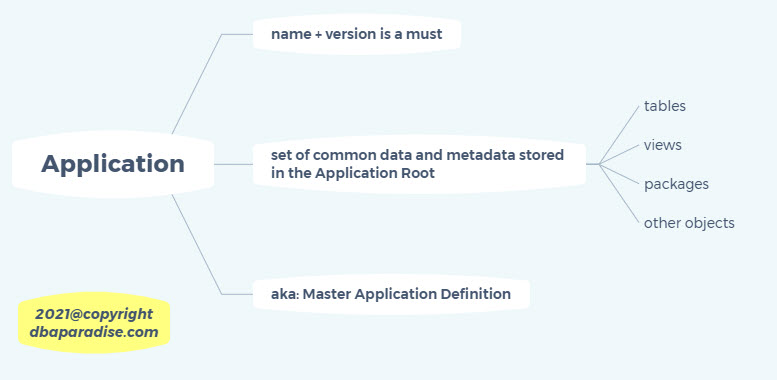
The Application is a named, versioned set of common data and metadata that is stored in the Application Root.
This Application is also referred to as the master application definition. The application contains tables, views, packages and other objects. The application must have a name and a version number, you will receive an error if you omit these when you create the application. The version number is a string, it could be 1.0 or v1.0, so you are not constrained to numbers only.
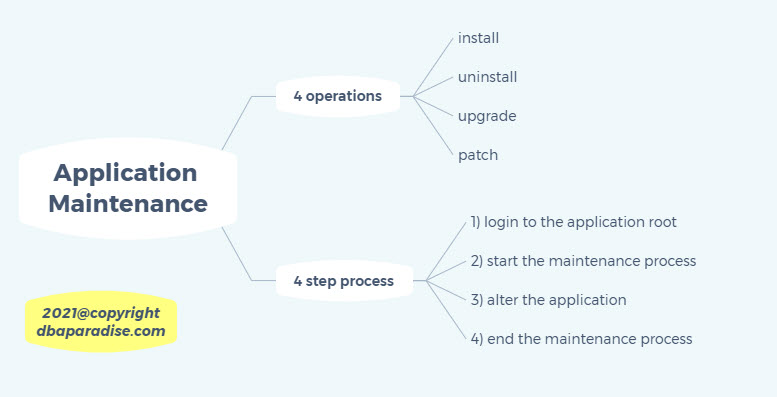
You can do 4 operations with the application, called Application Maintenance: install, uninstall, upgrade or patch.
The application maintenance is a 4 step process:
1) login to the application root. Your current container must be the application root.
2) start the maintenance process: this could be install/uninstall/upgrade/patch.
3) alter the application (you execute DDL and DML)
4) end the maintenance process (the process you started in step 2)
Let’s look at one of these operations today, the application installation. The other processes are similar, and we will look at them next time!
Application Installation:
When you install the application, you are actually creating the master application definition. At this point you will create users, tables, packages and other objects. As specified previously, you must specify the name of the application and the version number. The version number is a string, “1.0”, “v1.0”, “initial”, or whatever makes sense to you. You will not be able to create an application without a name or
version number. You can also have multiple applications within the same application root, of course each application with a different name.
Let’s go through the four steps of the application maintenance:
In these examples that follow we assume the following: the app_cont1 application container is already created, my CDB is not using OMF. We will create the hr_app application.
1) login to the application root.
sqlplus / as sysdba
select name, open_mode, application_root from v$pdbs;
NAME OPEN_MODE APPLICATION_ROOT
------------------------------ ---------- -----------------
PDB$SEED READ ONLY NO
TESTDBPDB READ WRITE NO
APP_CONT1 READ WRITE YES
--notice that APP_CONT1 is the application root (third column)
alter session set container=app_cont1;
2) start the maintenance process: install
alter pluggable database application hr_app begin install 'v1.0';
--notice we specified the name of the application, and the version v1.0.
--create a tablespace
create tablespace hr_app_data datafile
'C:\ORACLE\ORADATA\TESTDB\APP_CONT1\hr_app_data.dbf'
size 10M autoextend on next 10M maxsize 1G;
--create a schema that will host the objects. this will be a common user
create user hr_user identified by ***
container=ALL default tablespace hr_app_data;
--grant privileges to the user
grant create table to hr_user;
grant create session to hr_user;
grant unlimited tablespace to hr_user;
--create a table, with the options SHARING=METADATA
create table hr_user.test_table1 SHARING=METADATA
(id number(5),
description varchar2(30)) tablespace hr_app_data;
4) end the maintenance process
alter pluggable database application hr_app end install 'v1.0';
--we end the installation.
--we specified again the name and version of the application
The other maintenance operations work similar. I’ll show you next time! Until then, why don’t you try out the examples and let me know how it goes!
If you are interested in improving your Oracle Tuning skills, check out my course theultimatesqltuningformula.com. Follow the link to get the June Special, only $16.99 CAD!
Did you know you can test the course for 30 days with no risk?
Remember - sharing is caring...
Forward this email to a friend!
You're the best!
|
Sincerely,
Diana Robete
diana@dbaparadise.com
|
|
|
|
|