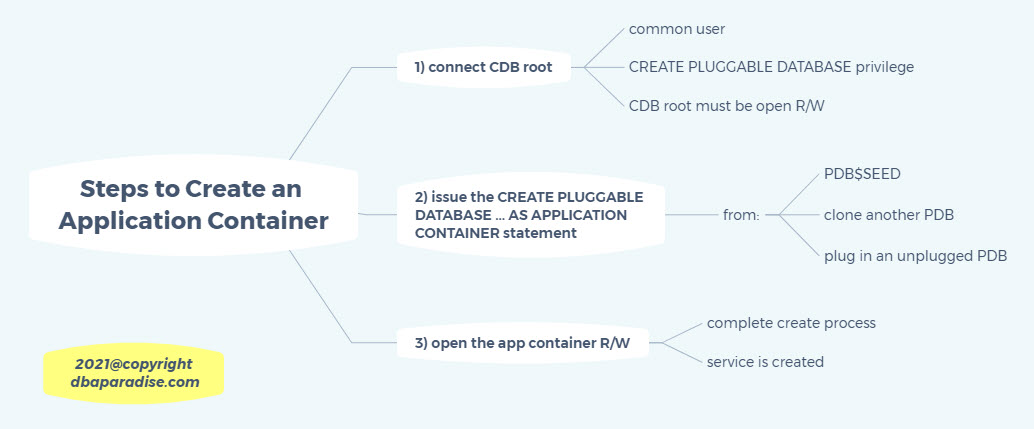
Application Containers can be created in many ways: from the PDB seed, by cloning an existing PDB, or plugging in an unplugged PDB. In all these cases you would be using the CREATE PLUGGABLE DATABASE statement. The clause that distinguishes this statement for the Application Container is the AS APPLICATION CONTAINER, you must include this clause to create an Application Container, otherwise
you just create another regular PDB. After creating a regular PDB, you cannot modify the PDB to become an Application Container. When you create an Application Container, the Application Root is also created at this time.
There are some pre-requisites for creating an Application Container:
To create the Application Container, you must be connected to the CDB Root, meaning your current container must be the root container. The CDB must be open in read write mode (which is obvious). Only a common user can create an application container, and must have the CREATE PLUGGABLE DATABASE system privilege granted. The name of the Application Container must be unique within the CDB, and all the other names
serviced by the same listener. This is due to the service name that gets created at the same time as the PDB.
Here are the 3 Steps to create the Application Container.
Step 1) Connect to the CDB root as sys (or other common user with the CREATE PLUGGABLE DATABASE system privilege)
Step 2) Run the create database statement. I am showing you three examples below. The first example assumes that you are using OMF, or that the PDB_FILE_NAME parameter is used. The Application Container is created from the PDB$SEED. The second example, creates the Application Container from the PDB$SEED as well, but it is not using OMF, or PDB_FILE_NAME parameter. That is why you must specify the
FILE_NAME_CONVERT parameter. The third example creates the Application Container by cloning PDB1 database. These examples should be run in different CDBs, one with OMF, one without OMF, as you cannot create an Application Container with OMF and without OMF in the same CDB.